Isolated workspaces
Every app gets its own cookie container, so you can sign into three Gmails at once and none of them know the others exist.
See workspaces →Gmail, Claude, Notion, Slack, Figma. SpaceDeck gathers your web apps into orbit around one deck. Each runs in its own isolated space, one keystroke away, and ⌘J opens a real shell right beside them. Not thirty lost tabs. A flight deck.
Apple Silicon & Intel · Signed and notarized · v2.3.3

The browser was built for reading pages.
You stopped doing that years ago.
You live in your apps.
SpaceDeck is the browser that finally treats them that way.
Keep your apps separate, bend them to fit, and carry them between Macs without an account in the middle.
Every app gets its own cookie container, so you can sign into three Gmails at once and none of them know the others exist.
See workspaces →Inject your own CSS and JavaScript per app. Hide the noise, restyle the chrome, automate the tedious. It re-applies on every load.
See power tools →Workspaces, bookmarks and settings sync over your own iCloud or Google Drive. No SpaceDeck account, no server in the middle.
See all features →Press ⌘J and your login shell opens beside the page. Your zsh, your dotfiles, your repo, in the same window as the apps you build against.
A real pty runs behind it, so whatever you run in Terminal.app runs here: git, npm, ssh, vim, and the agent you left working. True colour, clickable links, GPU-drawn text.
Every app in the left rail keeps its own shell in its own folder. Switch app and the pane switches with it, while the session you walked away from carries on running.
Gmail gets one, your repo gets another, each starting in the folder you gave it. Nothing to re-open, nothing to cd back into.
Drag the bar to move the pane, drag its edge to resize it. It comes back where you left it, at the size you left it.
Leave Claude Code running and go answer email. The rail shows it working, and the moment it needs you SpaceDeck rings, badges the app and files it in the notification centre.
There is no plugin catalog to wait on and no integration to request. If it runs on the web, it runs in SpaceDeck, inside its own contained space.




































 + Any URL you live in
A dozen refinements wired straight into the browser instead of bolted on as extensions.
A link that belongs to Slack opens in Slack's space. In the right session, never the wrong login.
Every app's alerts in a single bell, with a Do Not Disturb schedule you set once.
Every download tracked in one panel. Pause, resume, reveal in Finder.
SpaceDeck lives in the menu bar and answers a global hotkey. Front and center in one keystroke.
Set Gmail to 110%, mute Messenger for good. Remembered per app, every load.
Run the official Claude extension in a side panel and read the page you are on.
Three clients, three Gmails, two Slacks. Every account stays signed in inside its own space, and links always open in the right one. No more logging out to log in.
Isolated workspaces →A real shell on ⌘J, one per app, with agents that ring you when they want an answer. Boosts to restyle any app with your own CSS and JS. A global hotkey that summons the whole deck from anywhere.
Power tools →Ten apps shouting from ten corners becomes one bell with one unread count, a Do Not Disturb schedule, and a mute switch for the apps that never learn.
Focus features →You could keep juggling profiles and pinned tabs. Here is what changes when the browser is built for apps instead.
| Capability | Browser tabs | Other app browsers | SpaceDeck |
|---|---|---|---|
| Same app, many accounts, all signed in | Profile juggling | Yes | Yes |
| Every notification in one place | No | Yes | Yes, with DND schedule |
| Restyle apps with your own CSS & JS | Extensions only | Often a paid tier | Boosts, built in |
| A real shell in the window, one per app | No | No | Built in, free tier |
| Sync between machines | Via browser account | Via vendor account | Your own iCloud / Drive |
| Works without signing up | Yes | Account required | No account, ever |
A native macOS app. Your apps, your accounts, your machine. No cloud account to sign up for.
A workspace is a set of apps that share nothing. Every app runs in its own cookie container, so accounts never bleed into each other and each space stays exactly how you left it.
Each app you add gets a private session, cookies, storage and login kept entirely to itself. Three Gmails, two Slacks, a work Notion and a personal one can all stay logged in simultaneously, with zero incognito windows or browser profiles to juggle.
Switching spaces never logs you out of anything. The session is always waiting where you left it.
Sort your apps into workspaces like Personal and Work. Each space carries its own color, icon, default search engine, background, bookmarks and notes, so switching context feels like walking into a different room.
One click flips the whole deck. The right apps, the right accounts, the right mood.
Open a Figma link from Slack and it lands in your Figma space, in the account already signed in. External schemes hand off to the right native app.
Set a comfortable zoom for each app and mute the loud ones. SpaceDeck restores both every time the app loads.
Cookies, local storage and logins stay inside the app that owns them. No cross-site trail between your work and personal life.
The browser features you used to bolt on with a dozen extensions, wired into SpaceDeck and made to work together. No add-ons to trust, no settings scattered across five tabs.
Group apps into spaces, each app in its own cookie container. Stay logged into every account at once.
Links open in the app and account that own them, automatically. External schemes hand off to native apps.
A comfortable zoom and a mute switch remembered for every app, restored on each load.
Unread mail from every Gmail account in the space, newest first, with sender and subject. Pick one and it opens in the account it belongs to.
LinkedIn, Facebook, X, Slack and more show their unread count on the sidebar icon, read straight from the service. Watch them in the background without keeping a tab open.
Native notifications with sender and subject, drawn from the same unread feed as the badge. Quiet during Do Not Disturb.
⌘K to jump to any app, tab, workspace or URL, run an action, or search the full text of pages you have visited.
⌘⇧D keeps one app parked on the right edge (chat, calendar, an AI assistant) while you work in the main pane. It never covers the page.
Import from Chrome, Edge, Brave, Vivaldi, Arc, Opera, Safari or Firefox, folders and all. The browser you came from is never modified.
Every app's alerts collected into one bell, with an unread count and a tidy history you can clear.
Flip on quiet mode, or set a daily window and let SpaceDeck silence everything on time, every day.
Give an app a subtle sound when its unread count rises, throttled so it never turns into a racket.
Workspaces, bookmarks and settings sync over your own iCloud or Google Drive. Passwords and sessions stay on the device.
Track every download in one panel. Pause, resume, cancel, open, or reveal in Finder.
Send any page to PDF, Word, Markdown, Obsidian or Google Docs, or copy it clean, in two keystrokes.
Inject your own styles and scripts per app. Re-applied on every load, wrapped so a bad script never breaks the page.
A real login shell on ⌘J, one per app, backed by a genuine pty. Run the tests, reach for git, or leave an agent working without leaving the window.
SpaceDeck waits in the menu bar and answers a global shortcut from any app you are in.
Run the official Claude extension in a right-hand side panel and let it read the page with you.
The whole interface is localized and switches language in a single click.
Sensible minimum sizes and per-app zoom keep dense web apps comfortable to read all day.
SpaceDeck grew up in a terminal and never forgot. A genuine login shell sits beside the page you are working on, one for every app, and the rest of the keyboard-first kit is built in rather than bolted on.
Press ⌘J and your login shell opens beside the page. A genuine pty runs behind it, so git, npm, ssh, vim and every CLI you already live in run here exactly as they do in Terminal.app, in true colour, with links you can click.
Node is running, the repo is open, and the app you are testing is one pane away. No context switch to another window.
The terminal is not a single window you keep re-opening. It belongs to the app you are looking at, and it keeps running while you work somewhere else.
⌘J brings the pane up on the app you are in and puts it away again. Apps you never need a shell in can switch it off for good.
Every app in the left rail owns its own shell and its own starting directory. Switch app and the pane switches with it. The one you left keeps running.
Grab the bar and drop the pane where you want it, drag the edge to size it. It reopens exactly there next time.
Leave Claude Code or any other agent running. The left rail shows it still working, and when it stops for an answer SpaceDeck rings, badges the app and records it in the notification centre. Quiet hours still apply.
One shortcut throws the keyboard between the page and the shell. Shift+Enter puts a newline into a TUI instead of sending it, and Japanese input composes without a character going missing.
The terminal is there on the free tier, from the first launch. No add-on, no upgrade prompt, no separate licence.
Give any app a Boost: your own CSS and JavaScript, injected on every load. Hide a promo rail, restyle a cramped toolbar, or automate a click you make forty times a day. Scripts run wrapped in a guard, so a mistake never takes the page down with it.
Boosts travel with the app when you sync, because they are part of how you use it.
Hit ⌘P and send whatever you are looking at straight to the format you need. No print dialog roulette, no copy-paste cleanup.
Summon SpaceDeck to the front from inside any app, and send it away just as fast. Rebindable to whatever fits your hands.
SpaceDeck waits quietly in the menu bar. Click to bring it forward, open a fresh tab, or quit.
Dock the official Claude extension on the right and let it read the current page with you.
A real shell on ⌘J, Boosts, and a global hotkey. SpaceDeck bends to your workflow instead of the other way around.
From installing SpaceDeck to adding your first app and using it.
SpaceDeck lines up the web services you use every day, like Gmail and Slack, as apps in the left sidebar so you can switch between them. Start by adding one app and see how it feels.
The first time you open it, macOS asks: “SpaceDeck” is an app downloaded from the Internet. Are you sure you want to open it? SpaceDeck is notarized by Apple, so click Open. You will only see this once.
If there is no Open button, choose System Settings from the Apple menu, open Privacy & Security, scroll down to the SpaceDeck entry and click Open Anyway.
SpaceDeck opens on the Dashboard, its new-tab page with a clock, a search box, bookmarks and notes.
One workspace named "Main" is created for you. A workspace is a set of apps (see Use workspaces).
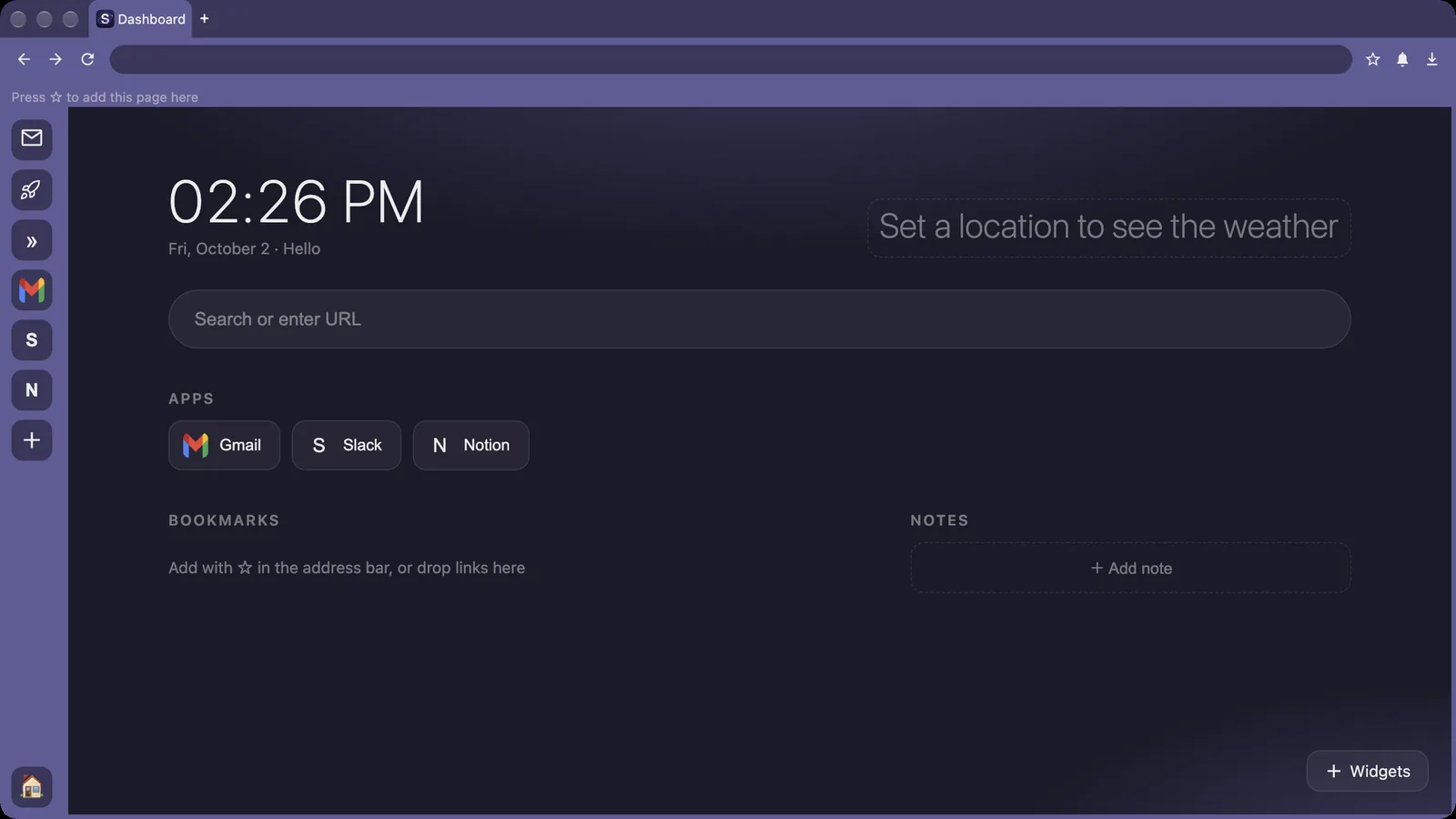
For more ways to add apps, see Add and organize apps.
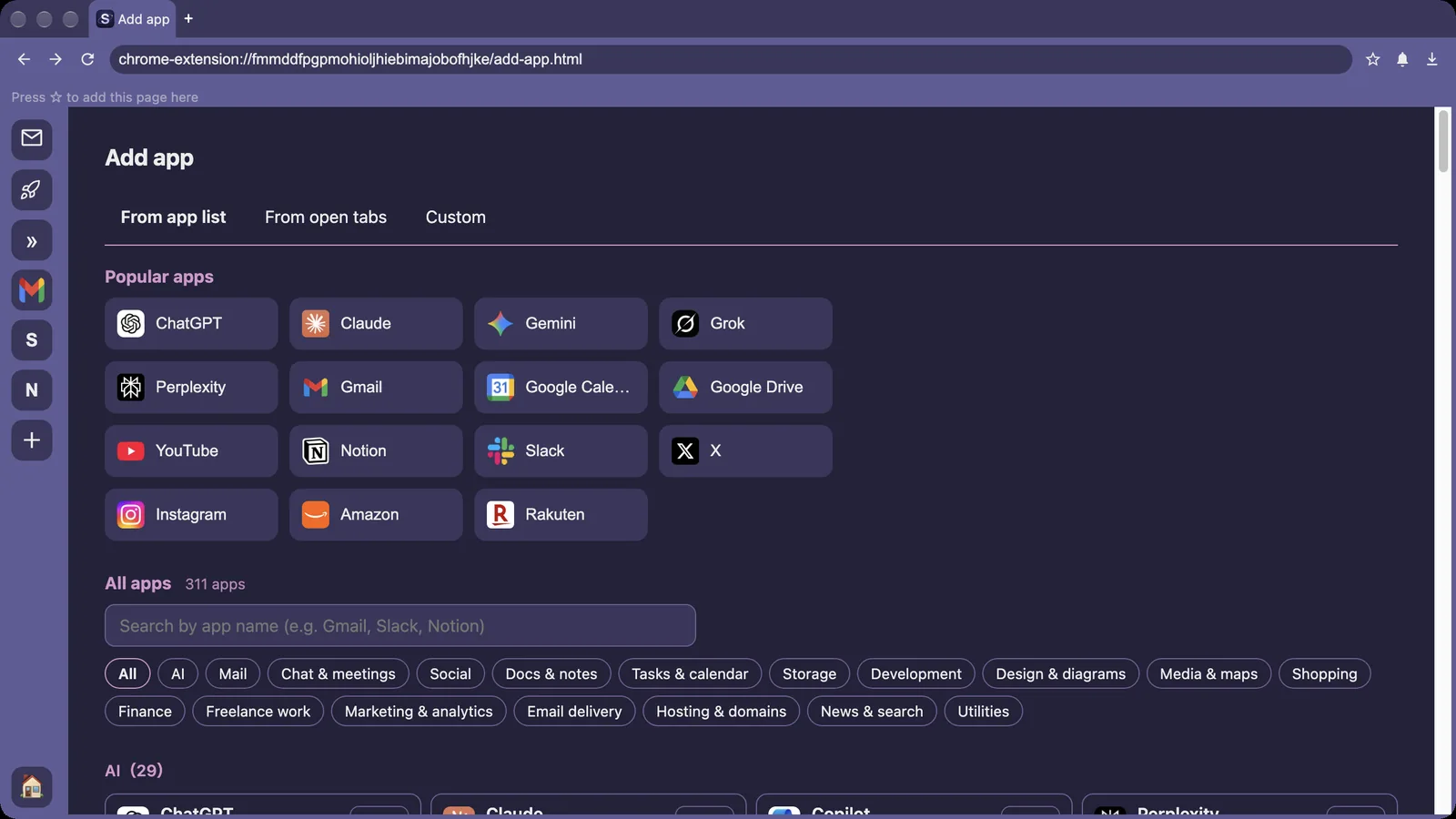
More keys are listed in Keyboard shortcuts.
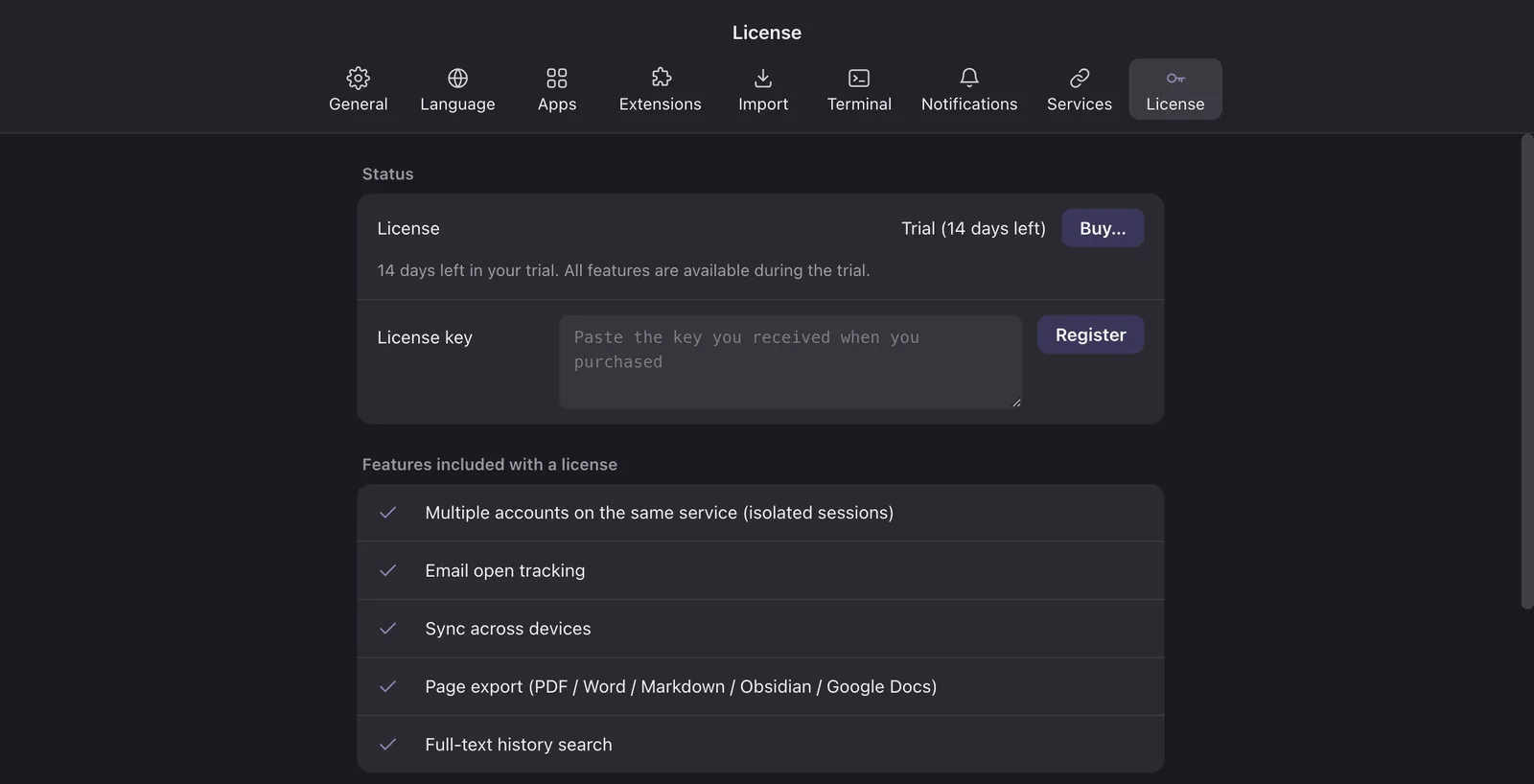
If something here does not work or you need a guide we do not have yet, let us know.
How to add apps to the left sidebar, rename, reorder and remove them, and sign in to one service with several accounts.
In SpaceDeck you use web services as apps. Apps sit in the left sidebar, and clicking one opens that service.
Use this for services that are not in the list, including internal tools.
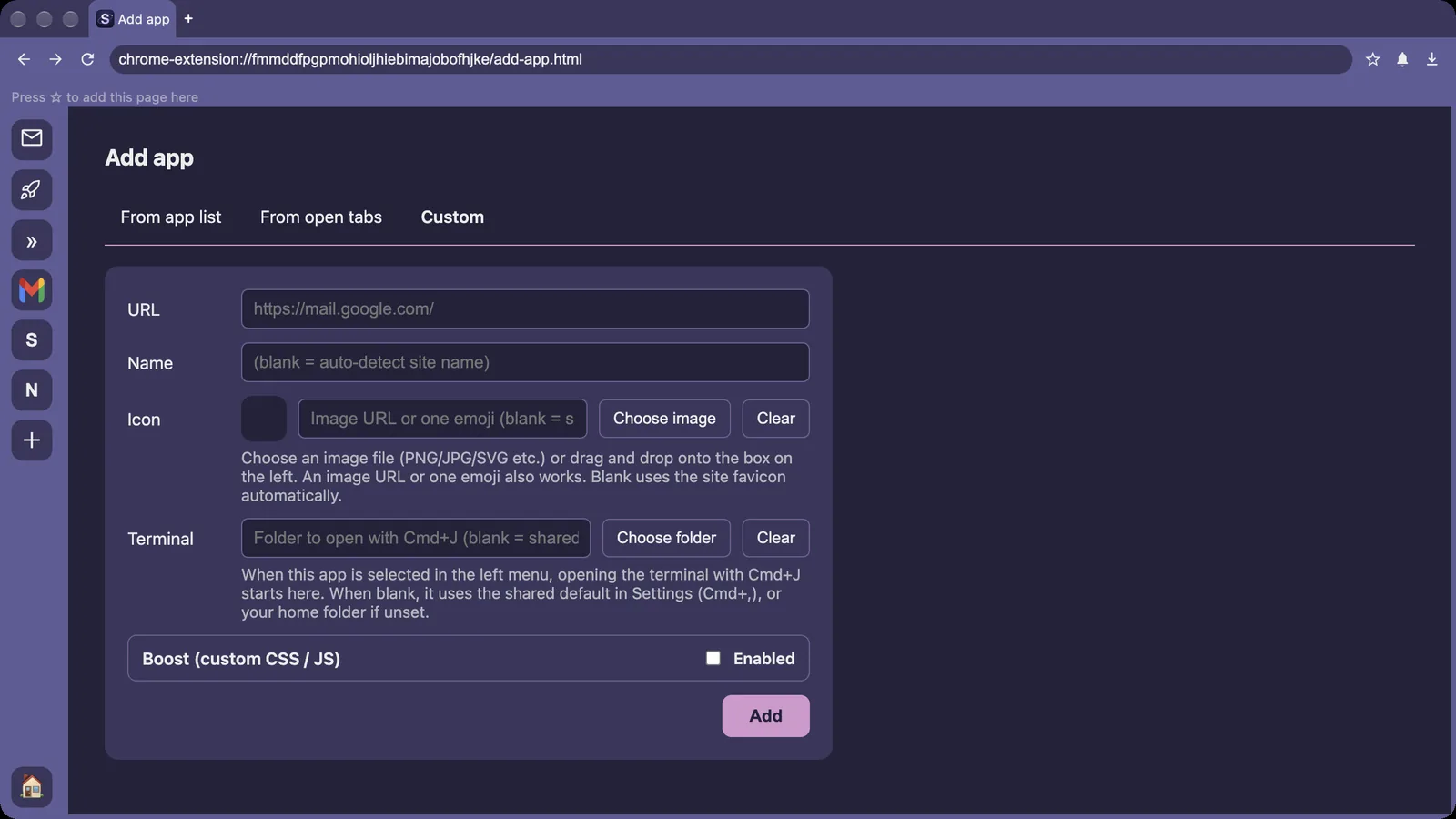
Each app keeps its own sign-in, so you never have to sign in again when switching. This is a Pro feature (also available during the trial).
If signing in gets stuck, right-click the app and choose the option to sign in again with a reset session.
If something here does not work or you need a guide we do not have yet, let us know.
How to create and switch workspaces, and change their name and color.
A workspace is a set of apps. Split them the way you work, such as your day job and a side project, or company A and company B, and each keeps its own apps and sign-ins. The free plan includes one workspace.
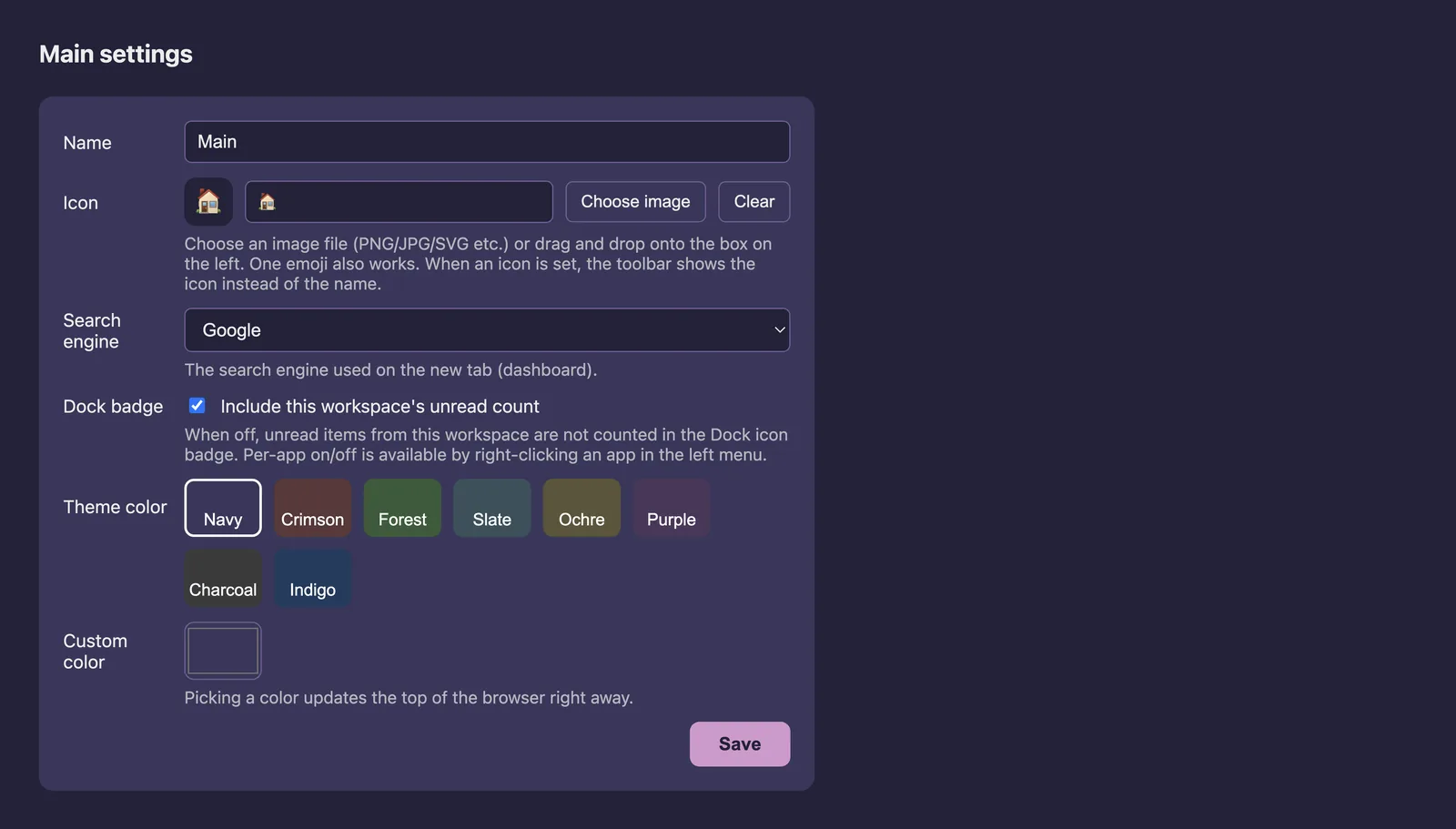
From the badge menu you can choose whether this workspace counts toward the number of new messages on the SpaceDeck Dock icon.
If something here does not work or you need a guide we do not have yet, let us know.
Where to find the notification center, Do Not Disturb, notification sounds and the Dock badge.
SpaceDeck gathers new messages from the apps you added. You can change how you are notified per app and by time of day.
Click the bell at the top right to open "Notifications". Switch between this workspace and all workspaces, and clear the list when you are done.
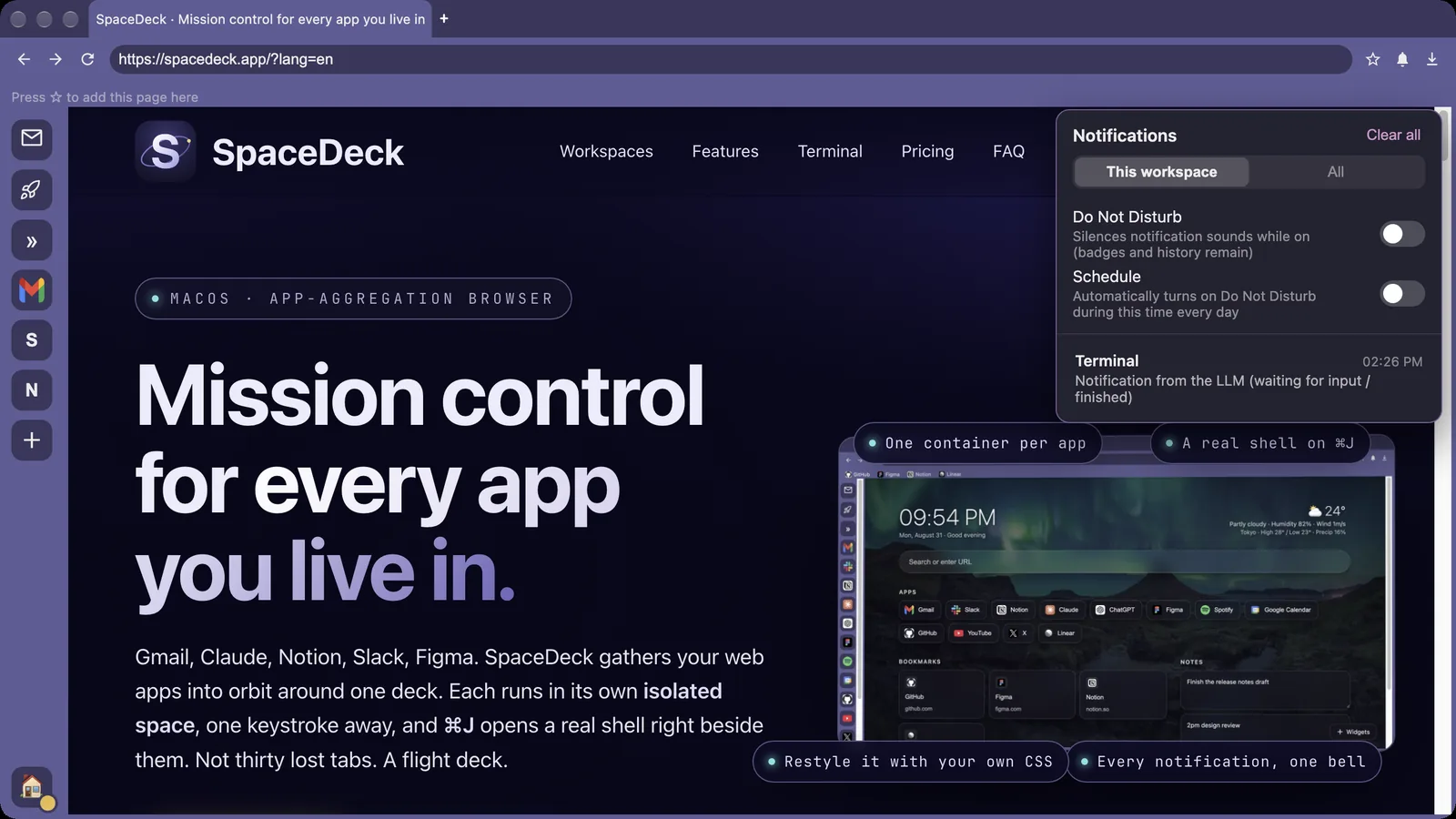
Right-click an app in the left sidebar to choose whether to receive its notifications, mute it, or play a sound once when new messages arrive.
Open Settings (⌘,) → "Notifications" → "Notification sound". Use the preview button to listen. Choose from SpaceDeck sounds, macOS system sounds or your own audio file.
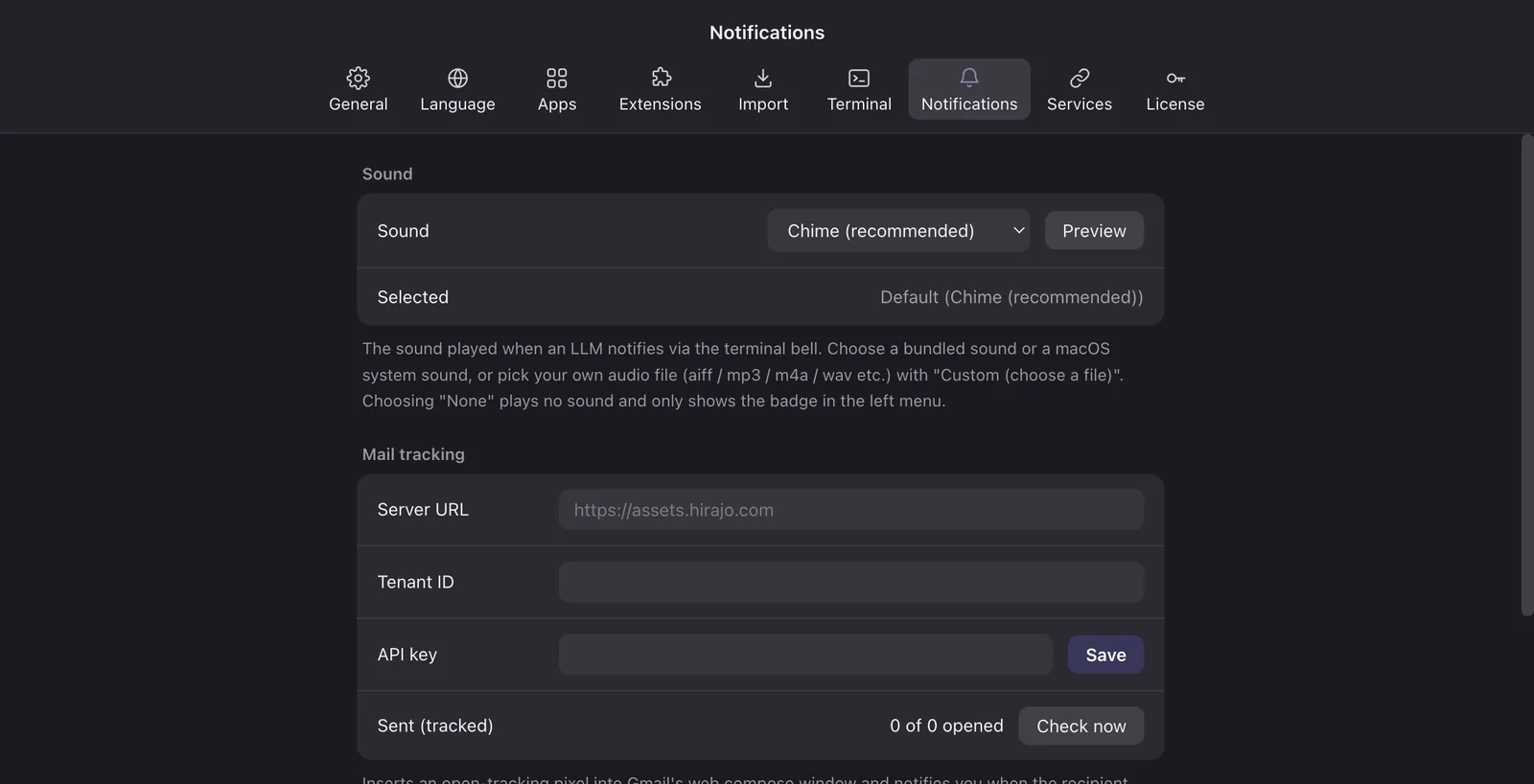
The SpaceDeck Dock icon shows the total number of new messages. Choose what counts toward it from an app's right-click menu or from the workspace badge menu.
If something here does not work or you need a guide we do not have yet, let us know.
Import bookmarks from Chrome, Safari, Arc and others, and add the services you use most as apps.
The "Import" tab in Settings imports bookmarks from other browsers. Nothing is written to the source browser.
Chrome, Edge, Brave, Vivaldi, Arc, Opera, Safari and Firefox. Bookmarks are imported; sign-ins and passwords are not, so sign in to each service once.
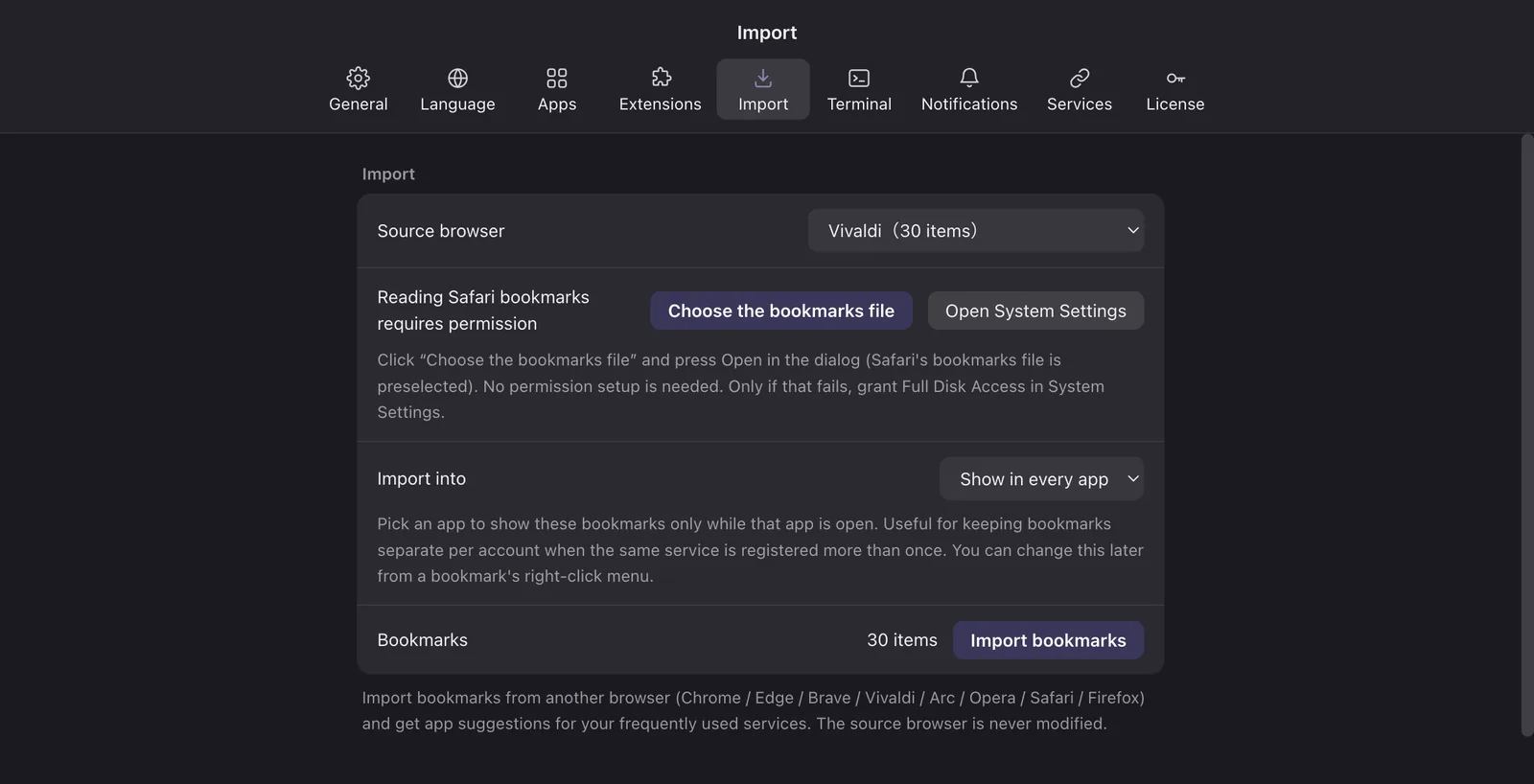
Services you use often appear as suggested apps. Check the ones you want and click the button to add them.
If something here does not work or you need a guide we do not have yet, let us know.
How to register the key you received after purchase, and how to release it when you change Macs.
Your license key arrives by email after purchase, or as a bonus. One license works on up to 3 Macs.
If the key is already used on 3 Macs, SpaceDeck tells you so. Release one you no longer use, then register again.
SpaceDeck checks the license once a day. Without a connection it keeps working for 30 days.
On the "License" tab, enter your email under the trial extension and send the confirmation email. Confirm it to extend the trial by 7 days (once).
If something here does not work or you need a guide we do not have yet, let us know.
The basics of the ⌘J terminal, how it is displayed, and how to choose the folder it opens in.
SpaceDeck includes a real login shell. Run git, npm, Claude Code and more right next to the app you are using. The terminal is included in the free version.
Press ⌘J to open and ⌘J again to close, or use "Terminal" → "Toggle Terminal" in the menu bar.
It does not open on SpaceDeck's own screens such as the Dashboard or Settings. Use it while an app like Gmail or a regular web page is open.
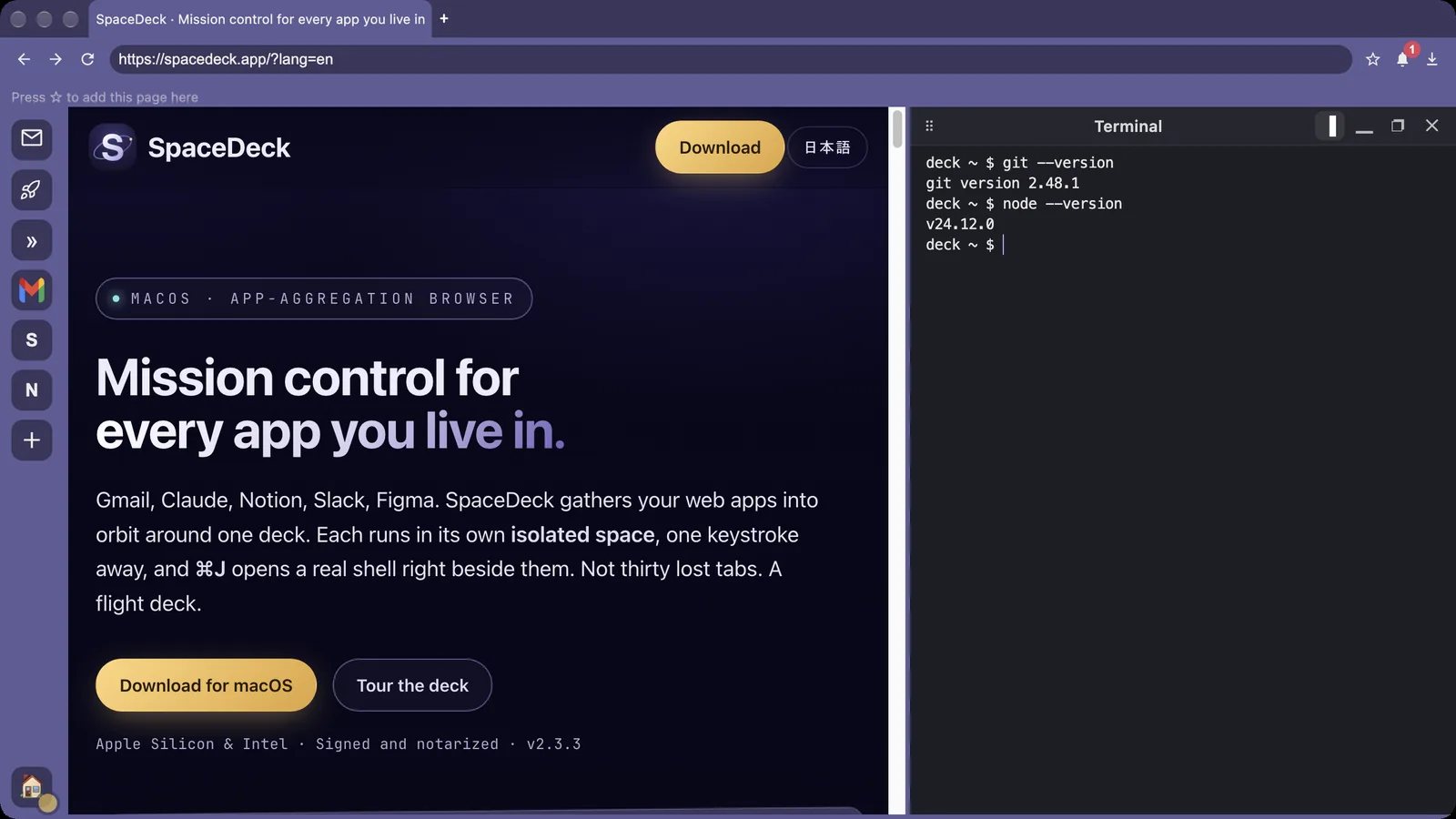
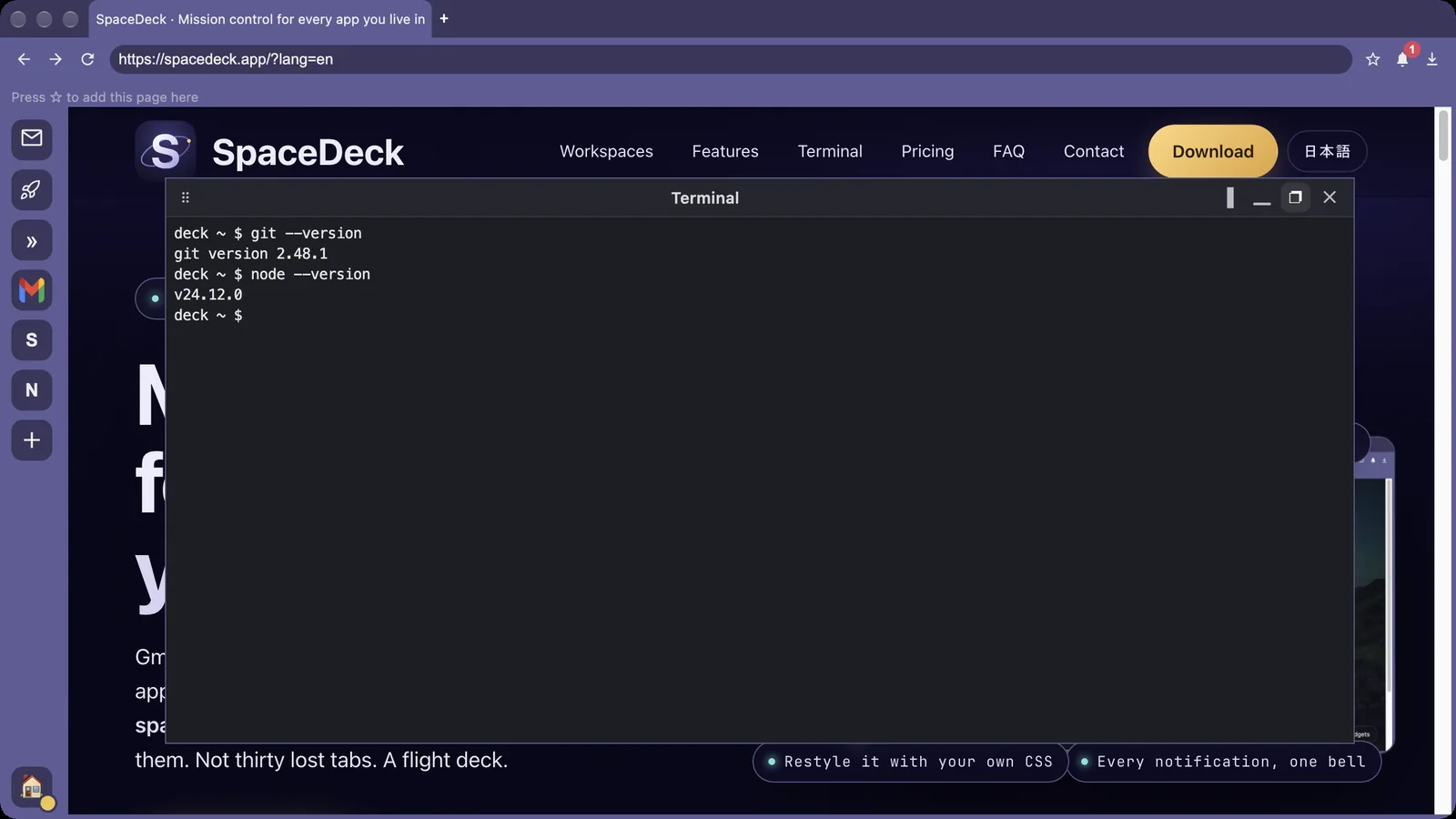
Use the buttons at the top of the terminal to choose "Dock right", "Dock bottom" or "Show as pop-up". Right and bottom place the terminal beside or below the page; drag the edge to resize, or drag the handle to move between right and bottom.
As a pop-up, the terminal floats large above the page without narrowing it, which suits narrow screens such as a laptop. ⌘J opens and closes the pop-up too.
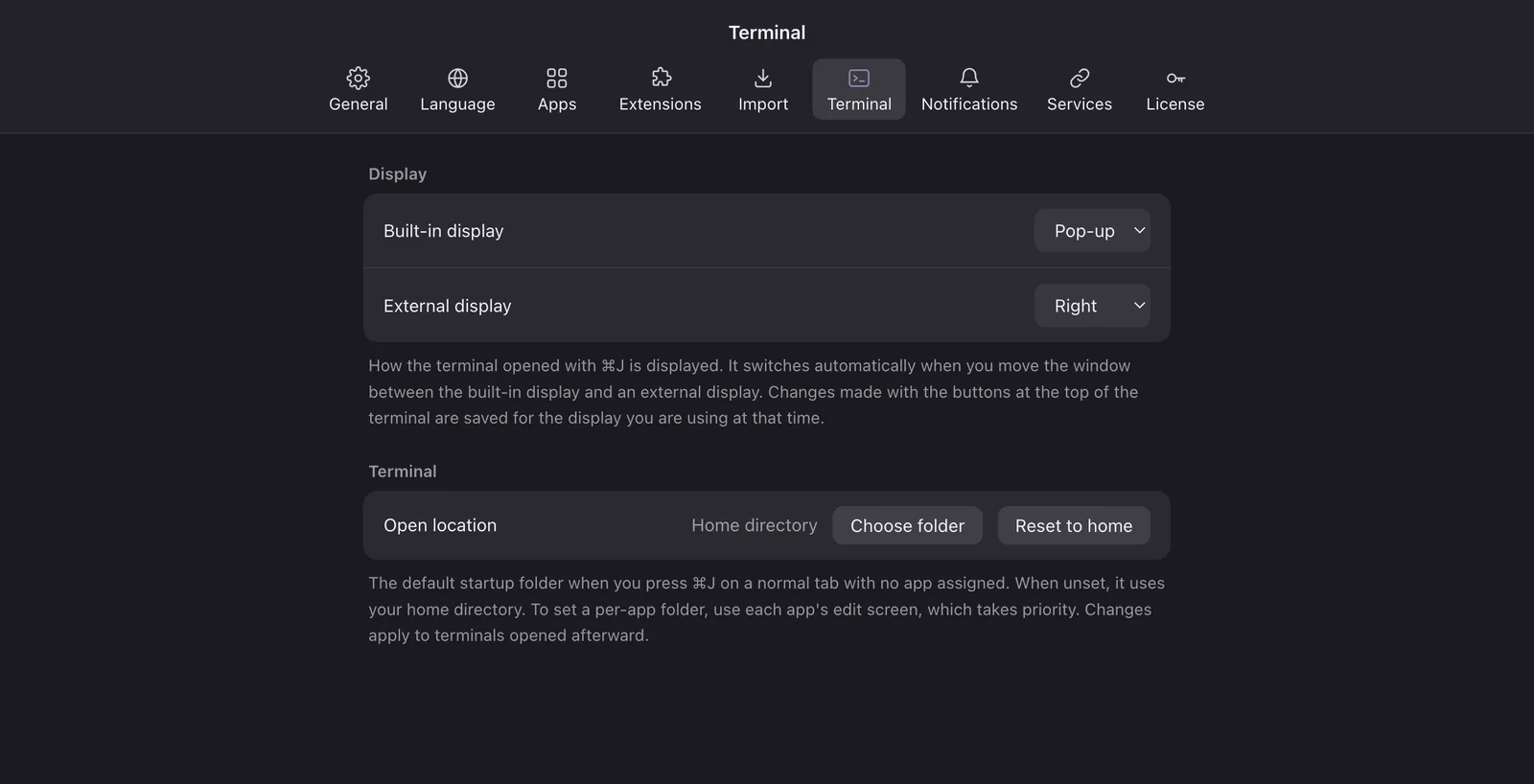
You can choose the display separately for the built-in display and external displays. In Settings (⌘,) → "Terminal" → "Display", pick "Right", "Bottom" or "Pop-up" for "Built-in display" and "External display".
When you move the window between the built-in display and an external display, the terminal switches automatically. For example: right on an external display, pop-up on the built-in display. Changes made with the buttons at the top of the terminal are saved for the display you are using at that time.
Each app has its own terminal. Switch apps and the terminal switches too, while the other one keeps running.
Leave Claude Code running while you do something else; SpaceDeck alerts you with a sound and a mark when it is waiting for input.
When you open a message in Gmail, a copy button appears to the right of the subject. Click it to copy just the subject, then paste it into the terminal for your agent.
To let an agent read Gmail, see Let the AI agent in your terminal read Gmail.
If something here does not work or you need a guide we do not have yet, let us know.
The main keyboard shortcuts in SpaceDeck.
Press "/" on a SpaceDeck screen, or choose "Keyboard shortcuts" in ⌘K, to see the list inside the app.
Press ⌘K to search apps, open tabs, other workspaces and history in one place, and to run actions such as a new tab, split view or opening Settings. Enter opens, ⌘Enter splits right, ⌥Enter opens in the side dock.
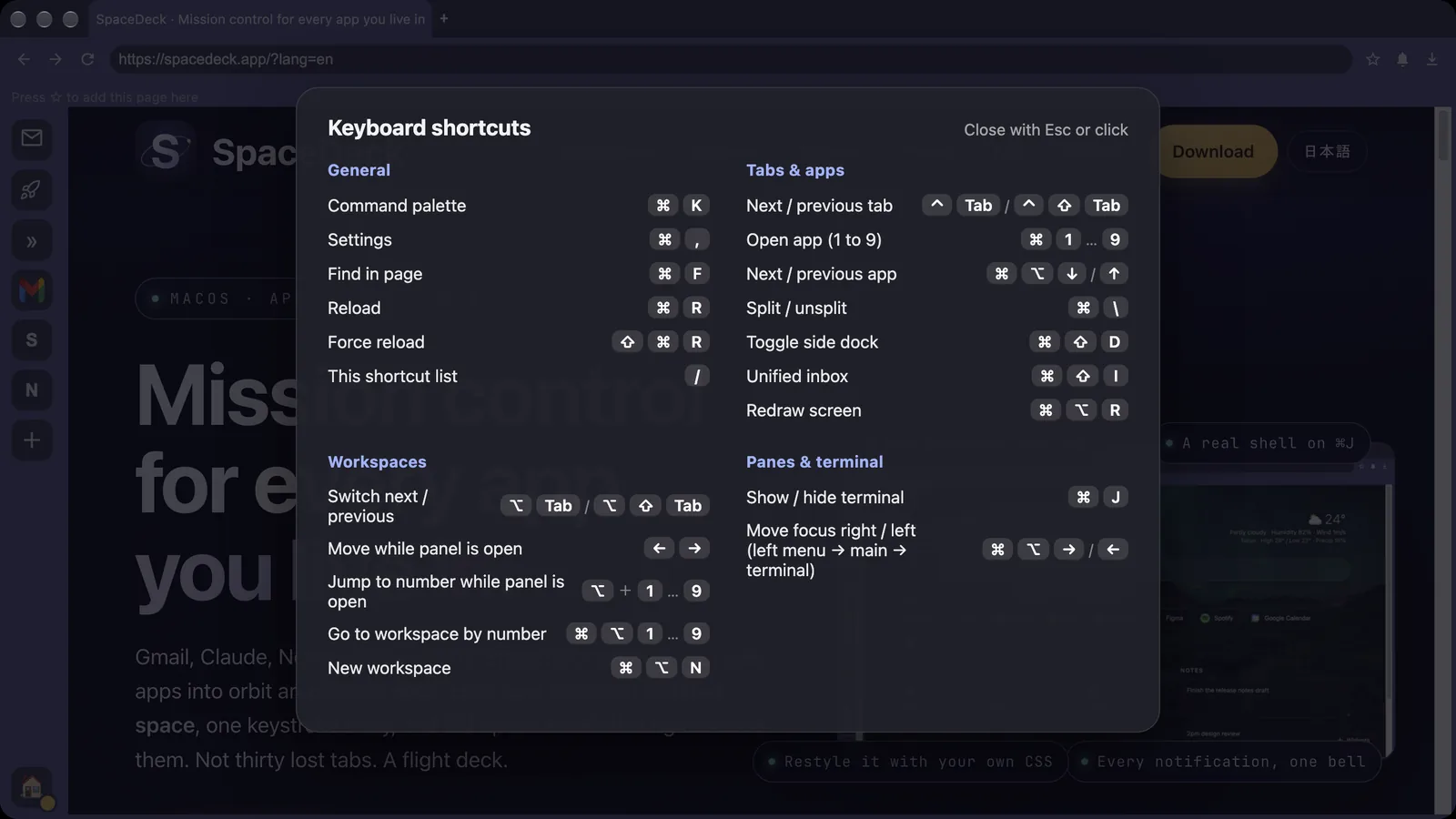
| Key | Action |
|---|---|
| ⌘1 to 9 | Open that app |
| ⌘⌥↓ / ⌘⌥↑ | Next / previous app |
| ⌘⌥1 to 9 | Go to that workspace |
| ⌥Tab / ⌥⇧Tab | Next / previous workspace |
| ⌘⌥N | New workspace |
| Key | Action |
|---|---|
| ⌘T | New tab |
| ⌘W | Close tab |
| ⌃Tab / ⌃⇧Tab | Next / previous tab |
| ⌘\ | Split view |
| ⌘⇧D | Side dock |
| ⌘⇧I | Unified inbox |
| ⌘[ / ⌘] | Back / forward |
| ⌘F | Find in page |
| Key | Action |
|---|---|
| ⌘J | Toggle terminal |
| ⌘⌥→ / ⌘⌥← | Move focus right / left |
| ⌘E | Claude side panel |
| ⇧⌘P | Export page |
| ⌘, | Settings |
If something here does not work or you need a guide we do not have yet, let us know.
How to let Claude Code, Codex CLI, Gemini CLI or any other AI agent running in SpaceDeck's terminal (⌘J) search and summarize your Gmail.
Gmail is read through Google Workspace CLI (the gws command), a command-line tool published by Google. It signs in with an OAuth client that you create in your own Google Cloud project, so your mail never passes through SpaceDeck or our servers.
gws is open source, and its authors state that it is "not an officially supported Google product." See the gws page on GitHub for details.
This file contains the secret for your project. Do not share it or upload it anywhere public.
Press ⌘J in SpaceDeck to open the terminal, then install gws with either command.
Then move the JSON file from step 04 into the folder gws reads.
Sign in with read-only access to Gmail.
Run gws auth status to check the sign-in state and the access you granted.
First, check that gws can list your unread mail on its own.
Once the list appears, start your AI agent (claude, codex, gemini and so on) in the same terminal and ask it, for example:
The agent runs gws gmail +triage and gws gmail +read to read your mail and sums it up. When the agent asks permission to run a command, check what it will run before you allow it.
Keep Gmail open on the left while an agent in the ⌘J terminal sorts through it. The terminal is included in the free version.
Setup guides for people who already use SpaceDeck. Every screen and command, in the order you need them.
From installing to everyday settings. New here? Start at the top.
The ⌘J terminal and the AI agents you run in it.
A native macOS app. Your apps, your accounts, your machine. There is no SpaceDeck account to create and nothing to sign up for.
Signed and notarized by Apple. Download, drag to Applications, and add your first app.
Your download has started. If you would like to hear about new features and updates, leave your email address (unsubscribe anytime).
Thanks! We will let you know about new features and updates.
SpaceDeck keeps your logins, cookies and sessions on your Mac. Sync, when you turn it on, runs through your own cloud storage, so your workspaces move between machines without passing through anyone else's server.
No SpaceDeck account means no profile to leak, and nothing to delete but the app itself.
No account, no credit card. When the trial ends, your everyday work keeps going on the free plan.
Forever. No ads, no waiting screens, no timers.
No limits. Everything unlocks.
How far the free plan goes across this category, based on each vendor's published pricing as of August 2026.
| Product | Free plan limits | Paid (per month) |
|---|---|---|
| SpaceDeck | 1 workspace / 3 apps | $7 ($60/yr · $129 one-time) |
| Wavebox | 2 spaces / effectively 4 apps / 1 extension | $8.33 (billed yearly) |
| Shift | 5 spaces / 10 apps per space | $16.7 (yearly only) |
| Rambox | Unlimited apps, but 2 instances per app; workspaces are paid | $7 |
| Franz | 3 services / 1 workspace | $5 (one-time $149 available) |
| WebCatalog | 2 apps / 1 workspace | $5 (billed yearly) |
| Ferdium | No limits (open source, donation funded) | None |
The free plan simply limits how many things you can add. We never interrupt your work with an ad or make you wait on launch. One workspace with three apps stays free, indefinitely.
When the trial ends, nothing is deleted. Anything above the limit stays on disk; we just ask you to go Pro when you open it, and it comes right back.
Pre-sales questions, licensing and billing, bug reports, feature requests. We reply by email within two business days. We never make sales calls.
A copy is on its way to the address you gave us. We will reply by email within two business days.
If the copy does not arrive, check your spam folder. If it is still missing, please send it once more through this form.
Paste the code you bought on AppSumo and we will turn it into a SpaceDeck license key. There is no account to create and no password to choose. The code and an email address are all we need.
AppSumo does not pass your address on to us, so this is the only way we can tell you about new versions. Unsubscribe anytime.
Thank you. We will write when there is something worth reading.
Other products gather your web apps too. The rows SpaceDeck loses are here as well. If Sidekick left you looking for somewhere to go, this is the honest picture. Based on what each vendor states on their own site as of August 2026.
| Feature |  SpaceDeck SpaceDeck |  Wavebox Wavebox |  Shift Shift |  Rambox Rambox |  Ferdium Ferdium | Sidekick |
|---|---|---|---|---|---|---|
| Status | Active | Active | Active | Active | Active | Shut down (acquired by Perplexity; the site now forwards to Comet) |
| Platforms | macOS only | macOS / Windows / Linux | macOS / Windows | macOS / Windows / Linux | macOS / Windows / Linux / FreeBSD | macOS / Windows / Linux |
| Account needed to start | —No | ✓Yes | △No (only to buy the paid plan) | ✓Yes | —No | ✓Yes |
| Several accounts of one service, signed in at once | ✓Yes (Pro) | ✓Yes | —Not stated on their site | △Yes (Pro only) | ✓Yes | △Yes (Pro only) |
| Notifications in one place | ✓Yes, with quiet hours | ✓Yes (Focus Mode) | —Not stated on their site | ✓Yes (Focus mode) | △Has notifications; no “one place” feature stated | △Per-app badges and a mute-all mode |
| Reshape apps with your own CSS and JavaScript | ✓Yes (free tier) | —No setting stated; ships a tool for building your own extension | —Not stated on their site | △Yes (Pro only) | ✓Yes (global, and per service) | —Not stated on their site |
| How it syncs | Your own iCloud / Drive (Pro) | Their cloud (Pro and up) | Their cloud | Their cloud | Their server, your own server, or manual backup | Their cloud |
| Built-in terminal | ✓Included (free tier) | —Not stated on their site | —Not stated on their site | —No | —Not stated on their site | —No |
| Chrome extensions | ✓Yes | △Yes (one on the free plan) | ✓Yes | △Only a list the vendor has vetted | —Not stated on their site | ✓Yes |
| Free tier | 1 workspace, 3 apps | 2 spaces, 2 apps each, 1 extension | 5 spaces, 10 apps each | Unlimited apps, but no workspaces, multi-login, extensions or CSS/JS; one device at a time | No limit | 5 apps in the sidebar, 10 in total |
| Paid | $7/mo · $60/yr · $129 one-time | $99/yr (about $8.33/mo) | $199.99/yr · $19.99/mo | $7/mo · $70/yr | None (Apache-2.0 open source) | was $12/mo |
“Not stated on their site” means we could not confirm it in their official material, not that the feature is missing. Sidekick was acquired by Perplexity and has shut down; its site now forwards to Comet. We leave the exact dates out because no official announcement is available. Prices and terms change; check each vendor for the current terms.
Look at one product at a time: Wavebox · Shift · Rambox · Ferdium · Sidekick
No jargon. Just what is different in daily use.
It works the moment you open it. No account screen, no email address. Most products in this category ask you to register before you can start.
Your work Gmail and your own Gmail, both open, side by side. No signing out, no private windows, no juggling profiles.
Every app reports to the same place. You can silence them by clock, too. Nothing between 9pm and 7am, for instance.
A real shell opens right next to your tabs, one per app, so you stop hopping between two windows. Agents you leave running in it ring you when they want an answer. It stays on the free tier.
“Hide that clutter”, “make the text bigger”. A few lines and it is done. Elsewhere this usually sits behind a paid plan.
Carrying your setup to another Mac goes through your own iCloud or Google Drive. We never hold it.
Subscribe monthly, or pay once and keep the major version you bought. Your call, not ours.
The free tier shows no advertising. No countdown on launch, no upsell popping up each time you reach for a feature.
Menus and settings ship in 32 languages, so nobody on your team is stuck reading a second language all day.
Pick a name and it lands on your rail with its icon. Each app runs in its own container, so you can keep as many accounts of the same service open as you like.
SpaceDeck opens web apps, so if it runs in a browser, a URL is all it takes. Internal dashboards, tools you host yourself, a service too new for this list: each becomes an app like any other.
We pull the icon from the site. When that fails, use any image or emoji you like.
Gmail iCloudOutlook
 Proton Mail
 Yahoo Mail
 Yahoo!メール
 ChatworkDiscord
 Google Chat
 Google Meet
 Kick
Kick LINE for Business
 LINE WORKSMessenger
 SHOWROOMSlack
 TeamsTelegram
 Twitch
 ViberWhatsAppZoomAsana
 ClickUpGoogle Calendar
 Google TasksJiraLinear
 TimeTreeTodoistTrello
 Yahoo!カレンダーAdobe Acrobat
 AppSheet
 Coursera
 Duolingo
 Excel Online
 Google Classroom
 Google Docs
 Google Forms
 Google Keep
 Google Scholar
 Google Sheets
 Google Slides
 Google Workspace
 iCloud Notes
 Microsoft 365Notion
 Qiita
Qiita Simplenote
 Word Online
 Zenn
Zenn AI Studio
 CapCut
 Character.AIChatGPTClaude
 Copilot
 DeepL
DeepL DeepSeek
 Dify
Dify Felo
Felo Gamma
Gamma Gemini
 Genspark
 Google Translate
 Grammarly
 Grok
Grok Hugging Face
 Manus
Manus Midjourney
 Napkin AI
 NotebookLM
 Notta
Notta OpenRouter
 Perplexity
 Poe
Poe Runway
 SeaArt
 Sora
Sora Suno
Suno Activepieces
 AWS Console
 bolt.new
 Cloudflare
 CodePen
 CodeSandbox
 Cursor
 Devin
Devin FirebaseGitHub
 GitHub Codespaces
 GitLab
 Gitpod
 Google Cloud
 Kaggle
 Lovable
 Make
Make n8n
n8n Pabbly
 Project IDX
 Replit
 Serper.dev
 StackBlitz
 Supabase
 v0
v0 Vercel
 Windsurf
 Zapier
 boardmixCanva
 Coggle
 draw.io
 ExcalidrawFigma
 Loom
Loom Lucidchart
 MindMeisterMiro
 Mural
Mural PhotopeaShopify
 Webflow
 Whimsical
 Wix
Wix XMind
XMind ABEMA
ABEMA Amazon Kindle
 Amazon Music
 Apple Music
 Audible
 DAZN
DAZN Disney+
 DMM動画
DMM動画 dアニメストア
 Flightradar24
 FOD
FOD Google Earth
 Google Maps
 Hulu
Hulu Lemino
 Netflix
 Prime Video
 radiko
 SoundCloudSpotify
 Steam
Steam TVer
TVer U-NEXT
 Vimeo
Vimeo Yahoo!路線情報YouTube
 YouTube Music
 YouTube Studio
 Ameblo
 BlueskyFacebookInstagramLinkedIn
 Medium
 Meta Business
 niconico
 note
note Pinterest
 pixivReddit
 Snapchat
 Threads
 TikTok
 Tumblr
 VK
VK WEBTOON
 X (Twitter)
 BoxDropboxGoogle Drive
 Google Photos
 iCloud Photos
 OneDrive
 99designs
 @SOHO
@SOHO CrowdWorks
 Fiverr
 Freelancer
 Guru
Guru Indeed
 Lancers
 PeoplePerHour
 Toptal
 Upwork
 ココナラ
ココナラ auじぶん銀行
 Binance
 freee
freee Investing.com
 MoneyForward
 PayPal
 PayPay銀行
 SMBCダイレクトStripe
 TradingView
 Wise
Wise Yahoo!ファイナンス
 みずほダイレクト
 ゆうちょダイレクト
 りそなマイゲート
 ソニー銀行
ソニー銀行 三菱UFJダイレクト
 住信SBIネット銀行
 楽天銀行
楽天銀行 Apollo.io
 Bing Webmaster Tools
 Buffer
 Google Ads
 Google AdSenseGoogle Analytics
 Google Trends
 HootsuiteHubSpot
 Hunter
 Iconosquare
 Kajabi
 Later
Later LoomlySalesforce
 Search Console
 Sendible
 Snov.io
 Sprout Social
 Tag Manager
 Vista Social
 AliExpressAmazon
 AppSumo
 Booking.com
 eBay
eBay SHEIN
SHEIN Yahoo!フリマ
 ZOZOTOWN
 メルカリ
メルカリ ヤフオク!
ヤフオク! ラクマ
ラクマ 楽天市場
楽天市場 食べログ
食べログ Amazon SES
 Brevo
Brevo Constant Contact
 EmailListVerify
 Geru
Geru Instantly
 Kit
Kit lemlistMailchimp
 Mailgun
 Mailjet
 Mailreach
 MillionVerifier
 NeverBounce
 Postmark
 Reoon Email Verifier
 Reply.io
 SendFox
 SendGrid
 Smartlead
 SocketLabs
 SparkPost
 Warmbox
 Woodpecker
 Yahoo Sender Hub
 ZeroBounce
 Bluehost
 Bunny.net
 ConoHa VPS
 ConoHa WING
 DigitalOcean
 Dynadot
 GoDaddy
 Google Domains (Squarespace)
 Hetzner
 Hostinger
 Linode (Akamai)
 Name.com
 Namecheap
 NameSilo
 One.com
 Porkbun
 SiteGround
 Spaceship
 UK2
UK2 Vultr
Vultr XServer VPS
 お名前.com VPS
 お名前.com ドメイン
 お名前.com レンタルサーバー
 さくらのVPS
 さくらのレンタルサーバ
 エックスサーバー
 ムームードメイン
 ロリポップ!
 Bing
Bing Feedly
 Google News
 Hacker News
 NewsPicks
 Yahoo! JAPAN
 Yahoo!天気
 日本経済新聞
 Amazon Alexa
 Bitwarden
 LastPass
 SwitchBot
Every page, with a line on what is inside it. If what you need is not here, tell us through the contact form.
What SpaceDeck actually does. Read these in order and you will have the whole picture.
How far the free tier goes, and how this compares with the alternatives.
Anything you cannot work out, and anything you would like us to know.
Who makes this, and the terms you are agreeing to.
Wavebox is a Chromium browser turned into an app browser, on macOS, Windows and Linux. It asks you to create an account before you start.
| Feature | SpaceDeck | Wavebox |
|---|---|---|
| Status | Active | Active |
| Platforms | macOS only | macOS / Windows / Linux |
| Account needed to start | No | Yes (an account is created during install) |
| Several accounts of one service at once | Yes (Pro) | Yes (Spaces isolate cookies) |
| Notifications in one place | Yes, with quiet hours | Yes (Focus Mode) |
| Reshape apps with your own CSS and JavaScript | Yes (free tier) | No setting stated; ships Wavebox Flow for building your own extension |
| How it syncs | Your own iCloud / Drive (Pro) | Their cloud (Profile Sync, Pro and up) |
| Built-in terminal | Included (free tier) | Not stated on their site |
| Chrome extensions | Yes | Yes (one on the free plan) |
| Free tier | 1 workspace, 3 apps | 2 spaces, 2 apps each, 1 extension, 1 dashboard |
| Paid | $7/mo · $60/yr · $129 one-time | $99/yr (about $8.33/mo); Teams $12.50/user/mo |
“Not stated on their site” means we could not confirm it in Wavebox’s official material, not that the feature is missing. Correct as of August 2026; prices and terms change.
Source: Wavebox · See all six products
It works the moment you open it. No account screen, no email address.
A real shell opens right next to your tabs, one per app, and the agents you leave running in it ring you when they want an answer. On the free tier.
Moving to another Mac goes through your own iCloud or Google Drive.
Subscribe monthly, or pay once and keep the major version you bought.
Shift groups your apps into Spaces on macOS and Windows. No account to start, but the paid plan is the most expensive here.
| Feature | SpaceDeck | Shift |
|---|---|---|
| Status | Active | Active |
| Platforms | macOS only | macOS / Windows |
| Account needed to start | No | No (only to buy the paid plan) |
| Several accounts of one service at once | Yes (Pro) | Not stated on their site |
| Notifications in one place | Yes, with quiet hours | Not stated on their site |
| Reshape apps with your own CSS and JavaScript | Yes (free tier) | Not stated (only 8 colour themes and layout changes) |
| How it syncs | Your own iCloud / Drive (Pro) | Their cloud |
| Built-in terminal | Included (free tier) | Not stated on their site |
| Chrome extensions | Yes | Yes |
| Free tier | 1 workspace, 3 apps | 5 spaces, 10 apps each (usage limits on Shift AI) |
| Paid | $7/mo · $60/yr · $129 one-time | $199.99/yr · $19.99/mo |
“Not stated on their site” means we could not confirm it in Shift’s official material, not that the feature is missing. Correct as of August 2026; prices and terms change.
Source: Shift · See all six products
It works the moment you open it. No account screen, no email address.
A real shell opens right next to your tabs, one per app, and the agents you leave running in it ring you when they want an answer. On the free tier.
Moving to another Mac goes through your own iCloud or Google Drive.
Subscribe monthly, or pay once and keep the major version you bought.
Rambox is an Electron app on all three desktop systems. The free plan has no cap on apps, but most of the features that matter here sit behind Pro.
| Feature | SpaceDeck | Rambox |
|---|---|---|
| Status | Active | Active |
| Platforms | macOS only | macOS / Windows / Linux |
| Account needed to start | No | Yes |
| Several accounts of one service at once | Yes (Pro) | Yes (Pro only) |
| Notifications in one place | Yes, with quiet hours | Yes (Focus mode) |
| Reshape apps with your own CSS and JavaScript | Yes (free tier) | Yes (Pro only) |
| How it syncs | Your own iCloud / Drive (Pro) | Their cloud (real-time sync) |
| Built-in terminal | Included (free tier) | No |
| Chrome extensions | Yes | Only a vetted list (not the Chrome Web Store) |
| Free tier | 1 workspace, 3 apps | Unlimited apps, but no workspaces, multi-login, extensions, CSS/JS or spellcheck; one device at a time |
| Paid | $7/mo · $60/yr · $129 one-time | $7/mo · $70/yr; Teams $14/user/mo (5 minimum) |
“Not stated on their site” means we could not confirm it in Rambox’s official material, not that the feature is missing. Correct as of August 2026; prices and terms change.
Source: Rambox · See all six products
It works the moment you open it. No account screen, no email address.
A real shell opens right next to your tabs, one per app, and the agents you leave running in it ring you when they want an answer. On the free tier.
Moving to another Mac goes through your own iCloud or Google Drive.
Subscribe monthly, or pay once and keep the major version you bought.
Ferdium is Apache-2.0 open source, free to download, with no caps. A strong choice if you are happy to tinker.
| Feature | SpaceDeck | Ferdium |
|---|---|---|
| Status | Active | Active |
| Platforms | macOS only | macOS / Windows / Linux / FreeBSD |
| Account needed to start | No | No (only for sync) |
| Several accounts of one service at once | Yes (Pro) | Yes (add the same service as often as you like) |
| Notifications in one place | Yes, with quiet hours | Has notifications; no “one place” feature stated |
| Reshape apps with your own CSS and JavaScript | Yes (free tier) | Yes (a global custom.css, plus user.css / user.js per service) |
| How it syncs | Your own iCloud / Drive (Pro) | Their server, your own server, or manual backup |
| Built-in terminal | Included (free tier) | Not stated on their site |
| Chrome extensions | Yes | Not stated on their site |
| Free tier | 1 workspace, 3 apps | No limit |
| Paid | $7/mo · $60/yr · $129 one-time | None (Apache-2.0 open source, donations) |
“Not stated on their site” means we could not confirm it in Ferdium’s official material, not that the feature is missing. Correct as of August 2026; prices and terms change.
Source: Ferdium · See all six products
It works the moment you open it. No account screen, no email address.
A real shell opens right next to your tabs, one per app, and the agents you leave running in it ring you when they want an answer. On the free tier.
Moving to another Mac goes through your own iCloud or Google Drive.
Subscribe monthly, or pay once and keep the major version you bought.
Sidekick has shut down. It was acquired by Perplexity and its site now forwards to Comet. We keep the comparison here for people looking for somewhere to move.
| Feature | SpaceDeck | Sidekick |
|---|---|---|
| Status | Active | Shut down (acquired by Perplexity; the site forwards to Comet) |
| Platforms | macOS only | macOS / Windows / Linux |
| Account needed to start | No | Yes |
| Several accounts of one service at once | Yes (Pro) | Yes (Pro only) |
| Notifications in one place | Yes, with quiet hours | Per-app badges and a mute-all mode |
| Reshape apps with your own CSS and JavaScript | Yes (free tier) | Not stated on their site |
| How it syncs | Your own iCloud / Drive (Pro) | Their cloud (encrypted on the device first) |
| Built-in terminal | Included (free tier) | No |
| Chrome extensions | Yes | Yes |
| Free tier | 1 workspace, 3 apps | 5 apps in the sidebar, 10 in total, 2 sessions |
| Paid | $7/mo · $60/yr · $129 one-time | was $12/mo |
“Not stated on their site” means we could not confirm it in Sidekick’s official material, not that the feature is missing. Correct as of August 2026; prices and terms change.
Source: Sidekick · See all six products
It works the moment you open it. No account screen, no email address.
A real shell opens right next to your tabs, one per app, and the agents you leave running in it ring you when they want an answer. On the free tier.
Moving to another Mac goes through your own iCloud or Google Drive.
Subscribe monthly, or pay once and keep the major version you bought.
Space
A space is a place of one’s own.
Gmail has one. Slack has one. Notion has one. Your work account and your own account never bleed into each other, because they were never in the same room to begin with. Close one and the others stay exactly as they were, waiting to carry on where you left off.
Space means the other thing too. We noticed that after the name was already chosen: the apps you live in, each on its own orbit, gathering in one place. It was too good a picture to ignore, and the night colours on this site came from it.
Deck
A deck is the deck of a ship: the one flat place, out on a rough sea, where a person can stand upright. Stand there and you can read the wind, the horizon, and the wave that is coming next.
Most of a working day now happens inside a browser. But thirty open tabs are not a deck. They are closer to driftwood. While you hold on to one, the rest float quietly away, and somewhere in the middle you stop being able to tell whether you are working or searching.
What we wanted to build was not one more plank. It was somewhere to stand.
Places of your own, laid out on a single deck. SpaceDeck is nothing more than that.

A rounded plate, one large S, and a single ring travelling around it. The ring comes from behind the S, crosses in front, and slips away behind it again. That one crossing is what sets a flat picture turning. It is tilted rather than face-on, because an orbit seen straight ahead does not look like it is moving.
Riding on the ring is one small point of gold: whatever has not arrived on the deck yet, the thing you are about to bring in. More points would only have made a busier picture; one keeps the feeling that something is still on its way. A few faint stars sit in the plate behind it.
That is all the name is saying.
The questions we are asked most, answered in full. Nothing here is folded away, so you can search the page with ⌘F. If your question is not here, write to us.
How far the free plan goes, and what Pro costs. These are the questions we are asked most.
One workspace and up to three apps, free for as long as you like. No adverts, and no waiting screen on launch.
The notification centre, download manager, bookmark import, built-in terminal, side dock and global hotkey all stay available on the free plan.
Every feature of Pro is open for fourteen days from the day you install it. No card, no account, nothing to sign up for.
When the fourteen days end, the app carries on as the free version.
No. Anything beyond the free limits is kept as it is. We simply tell you about it when you try to open it, and it opens straight away once you move to Pro.
Monthly and yearly plans always run the newest release. For the one-time licence, see the next question. Prices are in US dollars. Any sales tax or VAT that applies where you live is shown and added at checkout.
You keep the major version you bought (2.x, for example) with no time limit, including every fix released in that line.
When a new major version arrives, holders of a one-time licence are offered an upgrade at a reduced price. If you skip it, the version you own keeps working.
Credit cards: Visa, Mastercard, American Express and JCB. Stripe is the seller of record for purchases in US dollars, so your receipt comes from Stripe and any local sales tax or VAT is added at checkout. We never see or store your card number.
At any time. Billing stops from the next renewal and you stay on Pro until the end of the period you have paid for.
Write to us through the contact form.
Because this is a digital product, we do not, as a rule, refund payments already made. The fourteen-day trial is there so you can decide first.
Purchases in US dollars are handled by Stripe as merchant of record, so a refund is processed by Stripe. Write to us and we will arrange it.
If the product does not work because of a fault on our side, we will deal with it individually.
Stripe emails you a receipt as soon as payment completes. If you need one made out to a company name, ask us through the contact form.
How the licence key works, and how many Macs it covers.
Three at the same time. A Mac at home, a MacBook for work, and one to spare.
Release the licence on that machine from the app settings and the slot frees up. If the Mac has already gone, write to us through the contact form and we will free it for you.
It is emailed the moment payment completes, so please check your spam folder first.
If it is still missing, contact us with the email address you paid with and we will send it again.
Yes. Tell us how many people and we will send a quote and arrange a single payment. Use the contact form.
There is no such thing as a SpaceDeck account. You enter the licence key in the settings, and that is all.
What it is actually like once it is installed, including the questions people ask when moving over.
Yes. Enter a URL and any web service becomes an app. The 311 in the list are simply the ones you can add by picking a name.
Yes. Work Gmail and personal Gmail can both stay open. Each app has its own cookie container, so nothing you do in one reaches the other.
This is part of Pro.
They do. Install them from the Chrome Web Store as usual, including password managers and content blockers.
From Chrome, Edge, Brave, Vivaldi, Arc, Opera, Safari and Firefox, folder structure included. Your old browser is left untouched.
We do not import passwords. Install your password manager as an extension, or sign in to each service once. The session is then kept.
Yes, from macOS System Settings.
Press ⌘J and your own login shell opens next to your tabs, so you can run tests or reach for git without leaving the window. It can sit at the right of the window or along the bottom, and every app in the left rail keeps its own session in its own folder.
Yes. It is an ordinary login shell, so any command line tool you already use runs in it.
While an agent is working, the left rail shows that app still running, and the moment it stops to ask you something SpaceDeck rings, badges the app and records it in the notification centre. You can go and do something else while it thinks, and be called back when it matters.
Your own CSS and JavaScript, applied per app. Hide a panel you never use, make the text bigger, automate a click you make forty times a day. It is reapplied on every load.
Workspaces, bookmarks and settings sync through your own iCloud Drive or Google Drive. Nothing passes through our servers, and passwords and sessions never leave the machine.
This is part of Pro.
Thirty-two, switchable with one click, English and Japanese among them.
Where things are kept. This part is the product’s whole way of thinking.
Logins, cookies, sessions and history stay on your Mac. None of it is sent to us.
No. Sync runs through your own iCloud Drive or Google Drive. Workspaces move between your Macs without passing through us.
Only the request that checks your licence. We never receive the pages you visit or anything you type.
Nothing on our side. There is no account, so there is no profile to delete.
What it runs on, and where to write when something is wrong.
macOS only for now. Staying on one platform is what lets notifications and the menu bar behave the way macOS users expect.
No. The app is signed and notarised by Apple. Download it, drag it to Applications, and it opens.
The app checks for them and tells you when a new release is out.
Send it through the contact form. We reply by email within two business days, and we never make sales calls.
Questions before buying, questions about using it, bug reports: all of them come to the same place. We reply by email within two business days.
The terms on which you use the app and this site, written so that you can see what has actually been agreed. Prices and refund conditions also appear in the notice under Japanese commercial transactions law.
These terms govern your use of SpaceDeck, a macOS application, and of the pages at spacedeck.app, both provided by LIFE SCAPE, K.K. Installing the app means you accept them.
Subject to these terms, we grant you a non-exclusive, non-transferable right to use the app. All rights in the app remain ours.
The app is free, with no time limit, for one workspace and up to three apps.
For fourteen days from installation, every feature of the paid version is open, with no payment and no account. When those days end, we do not delete anything you created beyond the free limits.
You may cancel a monthly or yearly licence at any time. Billing stops from the next renewal and you keep access until the end of the period you have paid for. We do not refund part of a period.
The app is a digital product, and we do not, as a rule, refund payments already made. The fourteen-day trial is there so you can decide first. If the app does not work because of a fault on our side, we will deal with it individually.
Purchases in US dollars are sold by Stripe as merchant of record, so any refund is processed by Stripe. Write to us and we will arrange it.
While using the app, please do not:
Logins, cookies, sessions, history, settings and bookmarks are held on your Mac. They are not sent to our servers.
If you turn on sync, your data travels through your own iCloud Drive or Google Drive. It does not pass through us, and we do not read it. Your use of those services is governed by their own terms.
What reaches us is the request that checks your licence, and anything you write to us. How we handle it is set out in our privacy policy.
The app displays web services that you choose. We neither provide nor control them, and we are not responsible for their content, availability or terms, which apply between you and their providers.
The same applies to any extension you install: we make no warranty as to how it behaves or how safe it is.
We release updates to improve the app, fix faults and keep it secure.
We may change what the service offers, or stop offering it. If we stop, we will give notice wherever we can, and we will deal reasonably with holders of a paid licence in respect of a period already paid for or a major version already bought.
We do not warrant that the service will suit a particular purpose of yours, that it will be accurate or useful, that it will run without interruption or fault, or that it will remain compatible with third-party services in future.
When a third-party web service changes how it works, part of the app may stop working. We will address it as quickly as we can, but we cannot guarantee the outcome.
Except where we have acted with intent or gross negligence, our total liability to you in connection with the service is limited to what you paid us in the preceding twelve months.
We are not liable for lost profits, business interruption, lost data or any other indirect, special or consequential loss, even if we were told it was possible.
If you are a consumer under the Japanese Consumer Contract Act, this clause does not apply to the extent that Act makes it void.
We may change these terms when we judge it necessary. A change takes effect when it is published on this page, and we will give notice within the service beforehand if the change materially affects you.
These terms are governed by the law of Japan. The Tokyo District Court has exclusive jurisdiction in the first instance over any dispute arising in connection with the service.
Last updated: 1 September 2026